The Architecture Behind Digital Advertising Platforms
Why Do You See Ads for Products You Just Searched For? You have probably experienced this before: you browse several ecommerce platforms looking for a specific product, and shortly after, you start seeing advertisements for very similar products on other websites or applications.
This behavior is not random…
In this post, I will explain at a high level how a digital advertising system is architected, the key concepts behind it, and a real-world use case in which I participated while building such a system.
Impressions: The Foundation of Digital Advertising
One of the most important concepts in advertising is the impression. An impression represents each time an ad is displayed to a user.
Beyond counting views, impressions also allow the capture of additional metadata, as long as it is authorized by the target user, such as:
- Approximate location
- Device type
- Browser or operating system
Along with this information, a unique tracking identifier is generated to enable full traceability across the advertising campaign.
Ad Placements and Tracking Pixels
Most websites and applications provide ad slots where banners can be displayed, usually represented as images.
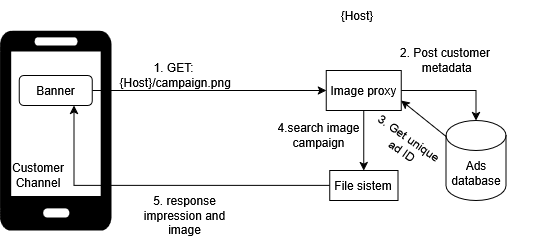
A common strategy for tracking impressions is the tracking pixel. This consists of a URL pointing to the advertising company’s host, which is requested through an HTTP GET in order to retrieve the banner image.
Since the request reaches a controlled environment, an image proxy can be implemented with the following responsibilities:
- Capture authorized user information from the request headers.
- Generate the unique impression tracking code.
- Retrieve the image from the internal file system or storage service.
- Return all required resources to properly render the image.
P.S. This strategy introduces additional latency when loading the image.For this reason, it is recommended to separate asynchronous responsibilities (logging, analytics, metrics) to improve performance and reduce overall system complexity.
Clicks: Measuring User Intent
Another critical advertising metric is the click (or tap).
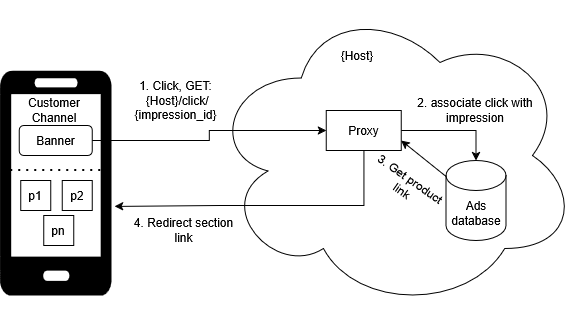
Clicks measure the user’s intent to learn more about a campaign or product. Similar to impressions, click events can also be tracked using a tracking strategy, which closely resembles the tracking pixel approach. The key difference is that:
- The unique impression identifier is passed as a parameter.
- The proxy registers the interaction event.
- The flow ends with a redirection to the campaign’s landing page or product listing.
CTR: Click-Through Rate
With impressions and clicks defined, we can calculate one of the most important advertising metrics: CTR (Click-Through Rate).
CTR is defined as:
Number of clicks / Number of impressions
This metric measures how relevant an advertisement is, typically ranging between:
- 0: Not relevant at all
- 1: Highly relevant
CTR provides a quantitative way to evaluate the effectiveness of an advertising campaign.
Competition and Advertising Auctions
Many companies invest in advertising systems because of their potential to better understand their target audience and increase sales.
However, advertising is a highly competitive market. Companies compete with one another to display their ads, usually through an auction-based system, where:
- Higher investment increases the probability of being shown. T* he system balances budget, relevance, and performance.
Below, I describe a real-world case I worked on.
Use Case: Multi-Ecommerce Advertising Platform
I worked on a platform designed around the concept of multiple ecommerce stores, where different companies could publish and sell a large catalog of products.
It was a centralized system with a high volume of users from different countries. I participated in building a banner advertising module that allowed companies to:
- Quickly launch advertising campaigns
- Increase sales rotation
- Gain deeper insights into their target customers
System Workflow
1. Company Wallet
Each company was provided with a wallet to manage its advertising budget, configurable on:
- Weekly
- Biweekly
- Monthly
2. Parallel Batch Process
A parallel batch process was implemented to collect and maintain information about:
- Products
- Brands
- Suppliers
P.S. this process was implemented from each company’s catalog.
3. Campaign Configuration
Companies could configure advertising campaigns using the following pricing models:
- Cost per thousand impressions (CPM)
- Cost per click (CPC) Supported advertising types included:
- Product-based advertising
- Keyword-based search
- Ecommerce sections (e.g., “Best Sellers”)
- Banner advertising (product bundles)
- Visual banner design and configuration
- Sponsored product selection Each campaign was configured with start and end dates and submitted for approval before going live.
Advertising Flow During a User Shopping Session
- Based on the advertising type, the platform requested an auction of N campaigns from the advertising service.
- The microservice evaluated:
- Impression cost
- Available campaign budget and selected N winning campaigns, generating a unique impression tracking code for each.
- When a user clicked on a sponsored product or banner:
- A click event was registered using the impression tracking code.
- For banner ads, impressions and clicks of individual products were reported using a root impression identifier.
- When a purchase was completed, the platform reported:
- Sold products
- Prices
Outcomes and Benefits
This architecture made it possible to:
- Unify investment, impressions, and clicks into a single flow.
- Identify the top-performing product of each campaign.
- Measure the real profitability of advertising efforts.
- Calculate metrics such as Return on Assets (ROA) per campaign and per product.